AI-Mode Search

About

The above search box can be used to search using Google's AI Mode. This website is not affiliated in any way with Google. This website is mainly meant for adding AI Mode as a search engine on Android Chrome :).

Set AI-Mode as the Default Search Engine in Chrome (Android)

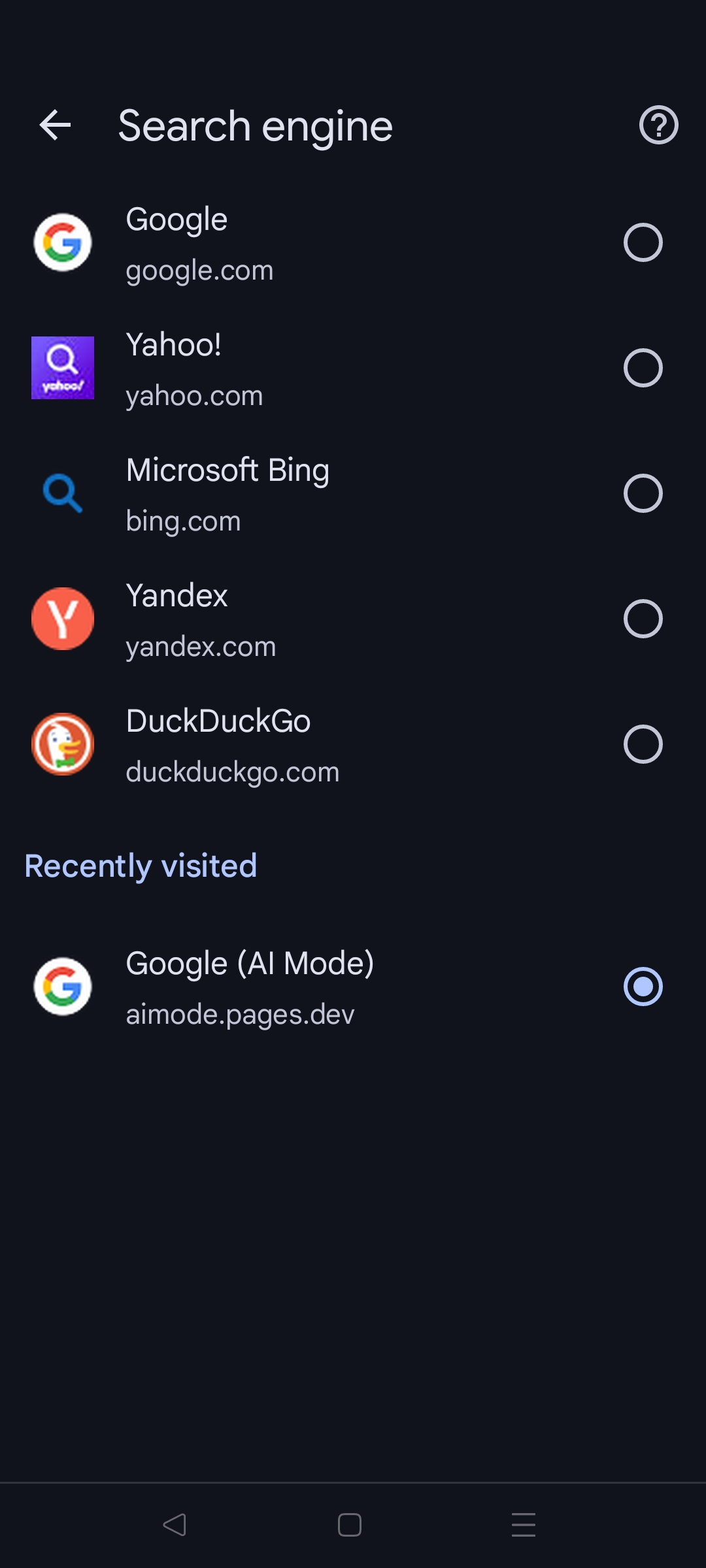
In the search engine settings of Android Chrome, a recently visited section will appear at the bottom of the page. AI Mode will appear in that section as "Google AI Mode" with a subtitle of "aimode.pages.dev".
AI Mode appears in search engines under recently visited.

This website makes it easy to set Google's AI Mode search as the default on Android. To set AI Mode as a search engine,

  1. Open this webpage — this registers AI Mode as an option
  2. Open Settings > Search Engine
  3. Under "Recently visited", select "Google (AI Mode)"